
More than a grade
An AI-written summary of your child.
In a few lines, the summary says whether the child is growing or steady, what they are strong at and what to practise. The home screen carries the week’s AI summary too.
For parents
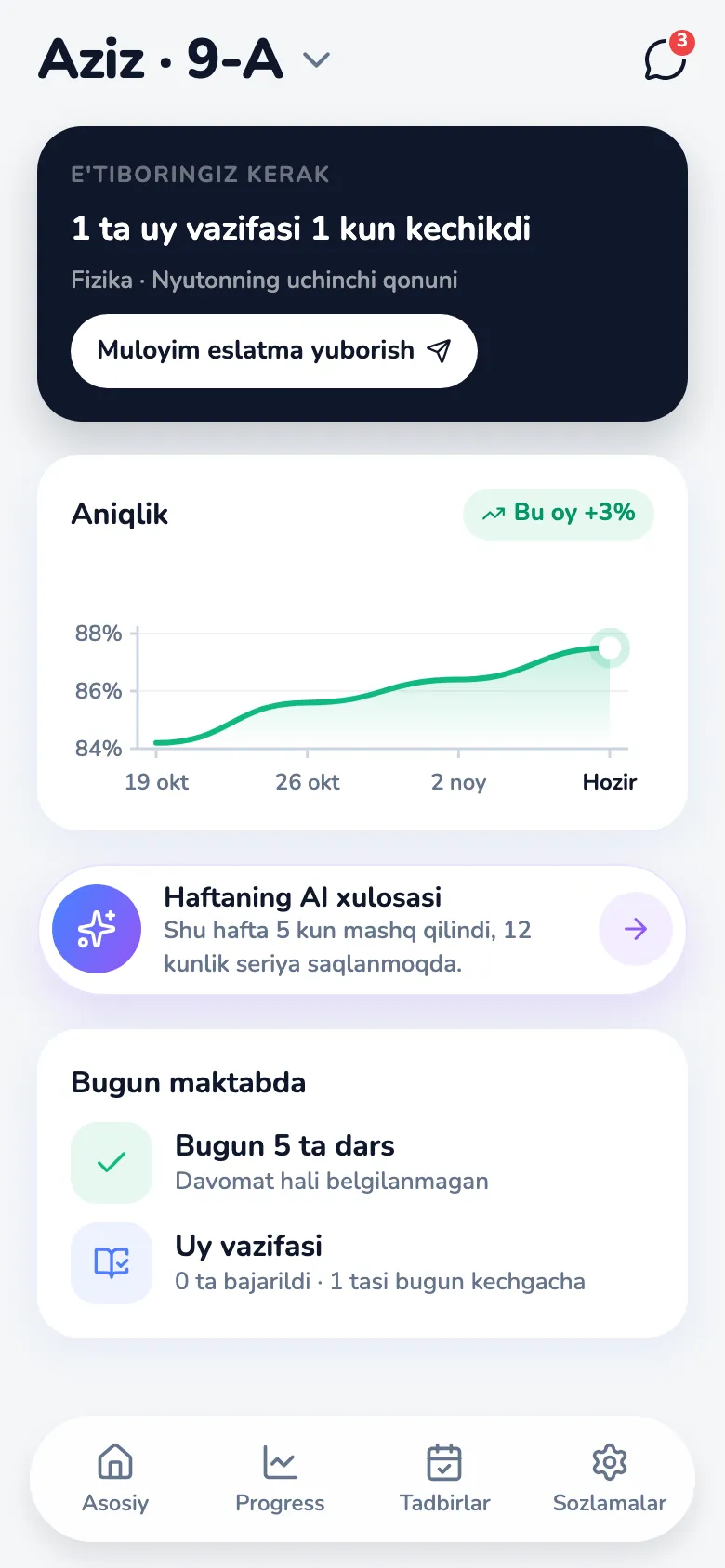
The parent app opens on the child’s week: homework, attendance and an AI summary. Weekly reports, school events and the teachers are one tap away.
Only the grade.
Not what the child actually understood.
News of a problem at the end of the quarter.
When the report arrives, and it’s late.
Teacher contact is scattered across chat groups.
The message that matters gets lost.
More than a grade
In a few lines, the summary says whether the child is growing or steady, what they are strong at and what to practise. The home screen carries the week’s AI summary too.
No waiting for the quarter
Home shows this week’s homework, done and still due, and today’s attendance. Late homework is flagged, and one tap sends the child a kind reminder. Progress holds the weekly reports, results by subject and a full report for the month. With more than one child, you switch between them.
Instead of chat groups
Parents message their child’s teachers one to one, each shown with the subject they teach.
A clear yes or no
When the school invites the child to an event, the parent approves it in one tap, or declines it with a short reason for the teacher.
Your school gives you a login: when our team sets the school up, it loads the parents from an Excel workbook. On the phone, you pick a new password at the first sign-in. There is no self-serve sign-up.
iOS and Android.
Uzbek, Russian and English.
A free 6-week pilot. Our team imports your classes; the success measures and a decision date are agreed up front.
After that, $20 per student per month.
Book a demo